2.3. Example: workflow with two models
The executable representation of simulation workflow in MuPIF is a Python script in Python language implemented using basic bulding blocks (called components) defined by MuPIF. These components represent fundamental entities in the model space (such as individual models (simulation tools), instances of data types, solution steps, etc). The top level abstract classes are defind in MuPIF to represent these components, defining a common interface allowing to manipulate individual representations using a single common interface. The top level classes and their interfaces are described in Section 2.4.
In this section, we present a simple, minimum working example, illustrating the basic concept. The example presented in this section is assumed to be executed locally. How to extend this and other examples into distributed version is discussed in Section 2.7.
The following example illustrates the so-called weak-coupling, where for each solution step, the first model (m1) evaluates the value of concentration that is passed to the second model (m2) which, based on provided concentration values (DataID.PID_Concentration), evaluates the average cumulative concentration (DataID.PID_CumulativeConcentration). This is repeated for each solution step. The example also illustrates, how solution steps can be generated in order to satisfy time step stability requirements of individual applications.
# Simple example illustrating simulation scenario

 import mupif as mp
 import model1
 import model2

 time = 0*mp.U.s
 timestepnumber = 0
 targetTime = 1.0*mp.U.s

 m1 = model1.Model1()  # create an instance of model #1
 m2 = model2.Model2()  # create an instance of model #2

 m1.initialize()
 m2.initialize()

 # loop over time steps
 while abs(time.inUnitsOf(mp.U.s).getValue() - targetTime.inUnitsOf(mp.U.s).getValue()) > 1.e-6:
     #determine critical time step
     dt2 = m2.getCriticalTimeStep()
     dt = min(m1.getCriticalTimeStep(), dt2)
     # update time
     time = time+dt
     if (time > targetTime):
         # make sure we reach targetTime at the end
         time = targetTime
     timestepnumber = timestepnumber + 1

     # create a time step
     istep = mp.TimeStep.TimeStep(time, dt, timestepnumber)

     try:
         #solve problem 1
         m1.solveStep(istep)
         #request temperature field from m1
         c = m1.get(mp.DataID.PID_Concentration, istep)
         # register temperature field in m2
         m2.set(c)
         # solve second sub-problem
         m2.solveStep(istep)
         prop = m2.get(mp.DataID.PID_CumulativeConcentration, istep)
         print ("Time: %5.2f concentraion %5.2f, running average %5.2f" % (istep.getTime(), c.getValue(), prop.getValue()))

     except APIError.APIError as e:
         logger.error("Following API error occurred: %s" % e )
         break

 # terminate the models
 m1.terminate();
 m2.terminate();
The full listing of this example can be found in examples/Example01. The output is illustrated in Fig. 2.1.
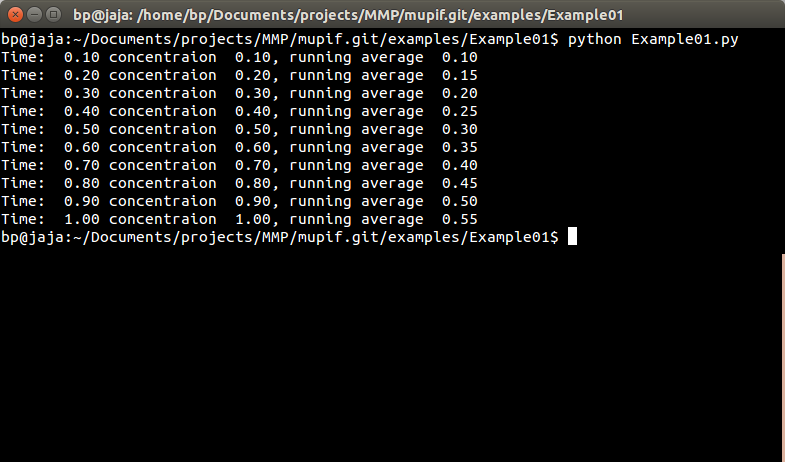
Fig. 2.1 Output from Example01.py
The platform installation comes with many examples, located in examples subdirectory of platform installation and also accessible online in the platform repository. They illustrate various aspects, including field mapping, vtk output, etc.